
Titan Locker
Managing & withdrawing
Every lock gets a certificate page — track the countdown, verify on-chain data, and withdraw once unlocked.
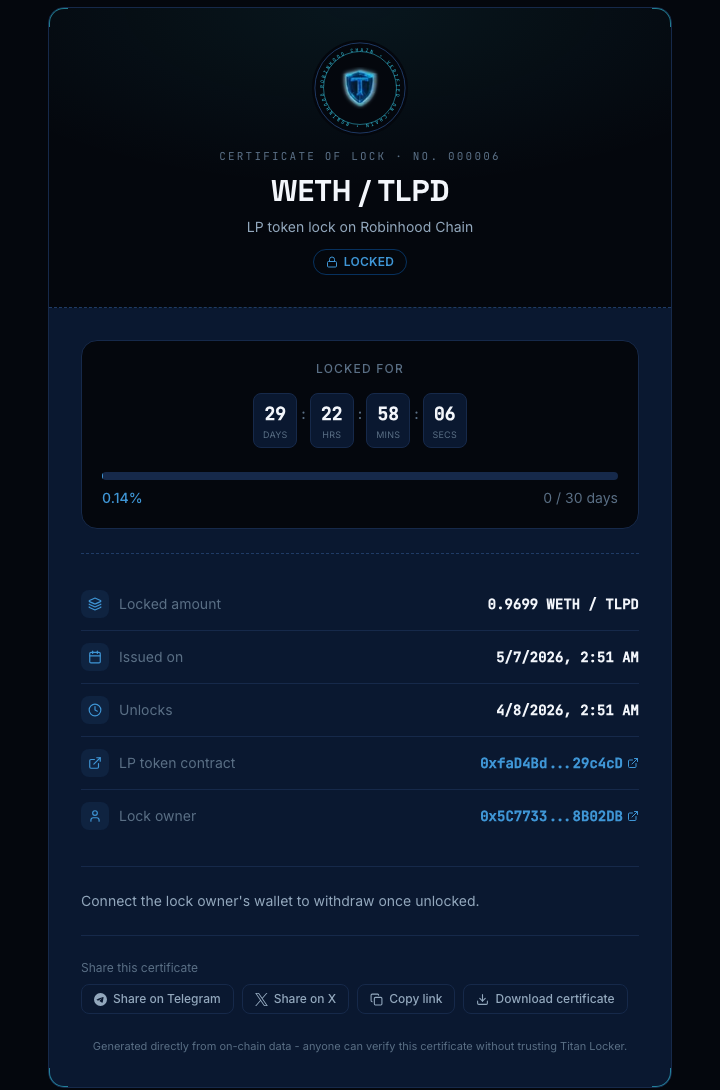
Every lock has its own certificate page at /lock/[id] — a shareable, verifiable record of the lock: token, amount, owner, issue date, and unlock time, all read directly from the contract.
The countdown
The DD:HH:MM:SS countdown ticks live and shows a progress bar toward the unlock date. Once the unlock time passes it switches to an “UNLOCKED” state; once the owner withdraws, it switches to “WITHDRAWN”.
Withdrawing
Only the lock's owner can withdraw, and only after the countdown reaches zero. Connect the owner's wallet on the certificate page and the withdraw button becomes active once unlocked. It always sends the lock's full current balance — for a Uniswap V3/V4 position, that's the position NFT itself, not the underlying tokens; the liquidity stays in the Uniswap pool exactly as it was.
Depositing more into a lock
A token or LP-token lock's owner can add to it later — the certificate page's “Deposit more or extend lock” button tops up the locked balance and, optionally, pushes the unlock date further out in the same transaction. There's no fee on a deposit like this (unlike the fee taken at lock creation), and withdrawing afterward returns the full balance, top-ups included. This isn't available for vesting locks (their schedule is fixed at creation) or Uniswap V3/V4 position locks (there's no fungible balance to add to — see below for how those extend instead).
Extending the unlock time
Every non-vesting lock can have its unlock time pushed later, never earlier — the contract itself rejects an earlier date. For a token or LP-token lock, leave the amount blank in the same “Deposit more or extend lock” form and just set a new date; the button relabels to “Extend unlock time”. A Uniswap V3/V4 position lock has its own separate “Extend unlock time” button next to “Collect trading fees”, since it can't use the deposit form at all. Vesting schedules can't be extended under any circumstance — their end date is fixed and irrevocable at creation.
Releasing vested tokens
A vesting lock has no single unlock gate — instead, the owner's page shows a “Release vested tokens” button and how much is currently releasable. Release sends the vested-but-unclaimed amount to the owner; you can call it repeatedly as more vests.
Collecting fees on a locked V3/V4 position
For a locked Uniswap V3/V4 position, the owner's page adds a “Collect trading fees” button that sweeps the position's accrued fees at any time, while the position NFT itself stays locked until its unlock date.
Sharing a certificate
Use “Share on Telegram” or “Share on X” to post the certificate's link and a caption. “Download certificate” saves the same image used for link previews as a PNG, useful for posting anywhere that doesn't auto-unfurl links.
Anyone can open a certificate page and verify it against the chain directly — the site doesn't need to be trusted for the data to be true.